Installing Gentoo on my Surface Pro 6
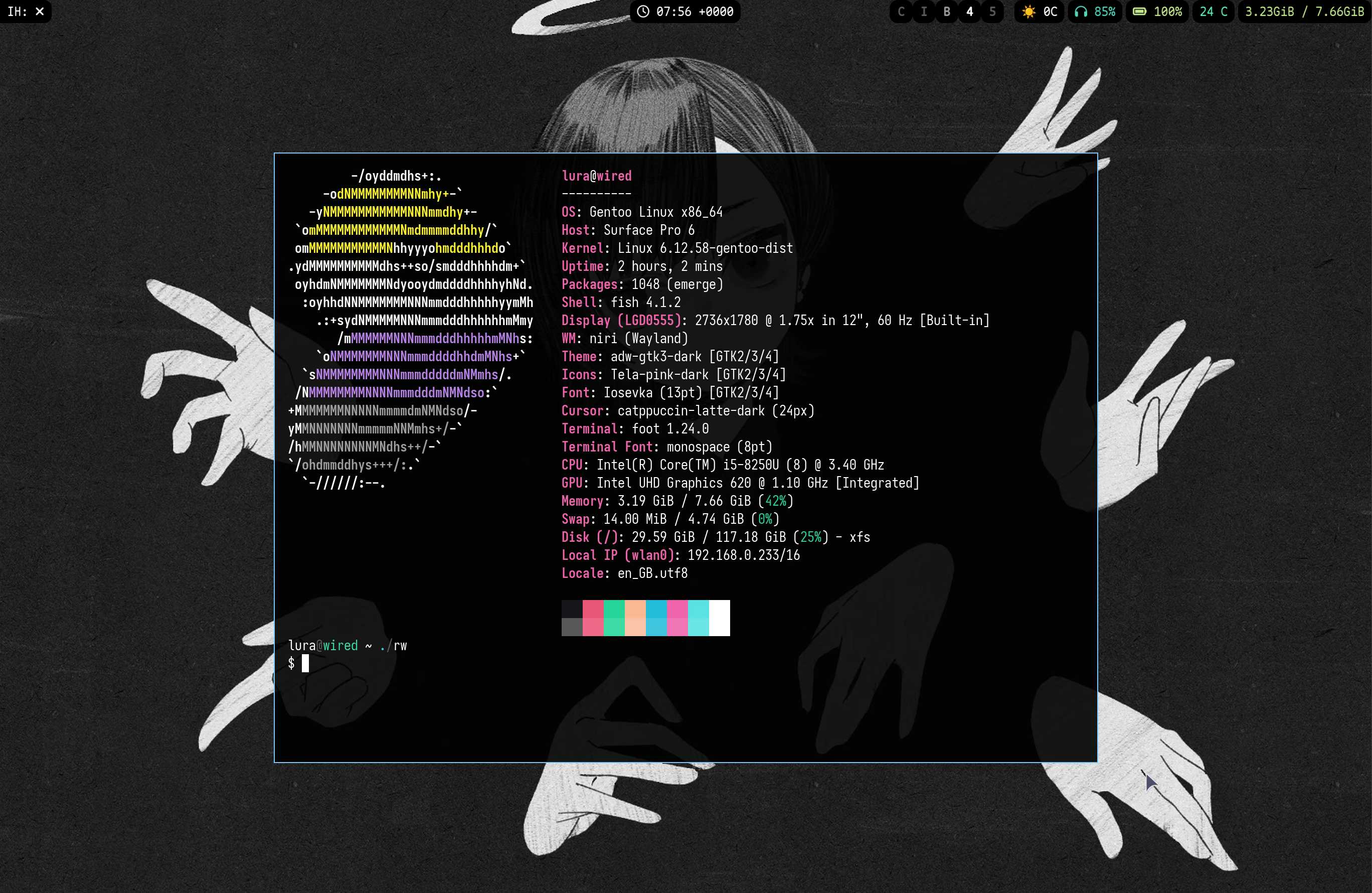
In 2019, I got a Surface Pro 6. I liked it a lot, but I kept Windows 10 on it because I figured that the Linux world's support for the Surfaces probably wasn't that good. When I broke the charger, I gave it to my mum because I was too cheap to buy a new charger. She's got a new laptop, so she gave the Surface back to me because she had no use for it anymore (with a new charger).
Thanks to the Windows 11 update, it's even slower than it was before. Whilst most old Windows machines are destined to spend their twilight years in a closet, or a glorified video player, or simply abandoned in a landfill like an unwanted BPD partner, I decided to install Linux on it to give it a new lease of life. Specifically Gentoo Linux, the same as I've used on my main computer for two years now.
Whilst most of the changes required for the Surface have been upstreamed to the kernel in recent
years, there is still a dedicated
linux-surface
repository that contains a patched kernel; thanks to the magic of Portage I should be able to
get these patches working with the upstream kernel nearly automagically without having to rely
on patched packages like binary distributions.
Install medium + first steps
I always use an Arch Linux ISO to install any Linux distribution. I've had bad experiences with the Gentoo install ISO, where it is literally a race against time to unpack the stage 3 and chroot into it before the squashfs completely self-destructs and every command gives an I/O error. I have no idea why it does this. I'm using a very old USB stick but it still works, at least long enough for the Arch ISO to unpack itself into memory.
Unfortunately I hit a fairly major problem immediately after booting: the wifi would just not
connect. iwctl station wlan0 connect <SSID> would hang forever no matter what
SSID I connected to. If I disabled iwd then my wifi adapter would disappear. The
last time I used wifi on Linux was when wifi-menu was a thing, so I have no
experience troubleshooting. I tried resetting the adapter with an
echo 1 > /sys/bus/pci/whatever/reset, which caused the driver to freak out and
the adapter to entirely disappear. I rebooted, tried iwd again, and it started
working again. I can only guess this is due to power saving nonsense and it felt a bit
ominous... Regardless, with working internet I switched over to my main PC and did the rest of
the install using ssh.
I've done the Gentoo install enough times that I can do it nearly automatically. During the install I decided I wanted to use KDE so I used a Plasma profile but after installing I tried to customise the top bar and got mad at it and switched to Niri instead. Everything else is the standard fare for a Gentoo install:
-
Select the profile:
eselect profile set default/linux/amd64/23.0/desktop/plasma/systemd -
Setup
make.conf:COMMON_FLAGS="-O3 -pipe -march=native -fno-omit-frame-pointer -mno-omit-leaf-frame-pointer" CFLAGS="${COMMON_FLAGS}" CXXFLAGS="${COMMON_FLAGS}" FCFLAGS="${COMMON_FLAGS}" FFLAGS="${COMMON_FLAGS}" RUSTFLAGS="-C target-cpu=native -C opt-level=3 -C force-frame-pointers=yes" VIDEO_CARDS="intel" ACCEPT_LICENSE="-* @FREE @BINARY-REDISTRIBUTABLE" BINPKG_FORMAT="gpkg" FEATURES="${FEATURES} binpkg-request-signature preserve-libs nostrip candy" - Add an x86-64-v3 binary package mirror, as opposed to the x86-64 binpkgs.
- Install git:
emerge -avg -j4 dev-vcs/git app-eselect/eselect-repository -
Switch the repositories to Git:
eselect repository remove -f gentoo && eselect repository enable gentoo
            && eselect repository enable guru && emaint --auto sync
From there, it's just installing the rest of the system as usual. I installed the
mold linker and added LDFLAGS="${LDFLAGS} -fuse-ld=mold" to
my make.conf so that compiled packages will be linked faster on the slow laptop
CPU. From there it was the same as any other Gentoo install with KDE. I avoided changing any USE
flags beyond the CPU_FLAGS ones as to match compatibility with the default binary
packages, at least until I have a booting system.
A custom kernel?
Gentoo provides a distribution kernel, which is a pre-configured kernel that works out of the
box for the majority of people. I use the distribution kernel (the binary version) on my PC but
there are some patches that make the Surface easier to use and I would like to use those. There
is a linux-surface overlay available from eselect but it only
provides a patched -sources distribution which I don't want to use (but it does
have userspace utilities); I want to use the distribution kernel instead.
Portage has the ability to patch packages via /etc/portage/patches, and the easy
ability to customise the kernel configuration using /etc/kernel/config.d for the
distribution kernel. Combining these I can build a lightly patched distribution kernel using the
linux-surface patches and a slightly modified configuration that disables some of
the heavier modules I know I won't be using (AMDGPU). As of the time of writing, the current
non-keyworded LTS distribution kernel is 6.12.58.
There's an issue on the issue tracker about later kernel versions causing the Fn toggle key to spam input events, which breaks KDE Wayland. There's a "PR" to fix it, but it's clearly written by somebody using Chud Code so I have no desire to use it, so I'll stick with 6.12 for a while anyway. Also, I switched away from KDE Wayland, so who knows if the issue is actually an issue.
I'll first unpack a fresh kernel in the default ebuild location, configure it, then copy my configuration over for when Portage builds the kernel.
# Unpack the kernel sources and apply the default configuration
$ ebuild /var/db/repos/gentoo/sys-kernel/gentoo-kernel/gentoo-kernel-6.12.58.ebuild configure
# Slightly configure kernel
$ cd /var/tmp/portage/sys-kernel/gentoo-kernel-6.12.58/work/modprep
$ cp .config .config-diff
$ make menuconfig
# Diff and apply changes to the config
$ diff --changed-group-format="%>" --unchanged-group-format="" .config-diff .config | tee /etc/kernel/config.d/changes.config
Editing note: I forgot to actually apply the configuration and spent two hours compiling the kernel on the very thermally throttled mobile processor. Oops!!!
Then I can apply the linux-surface patches, like so:
$ git clone https://github.com/linux-surface/linux-surface --depth=1 && cd linux-surface/patches/6.12
# I'll only copy a few over, since these are the ones that apply specifically to my SP6 and/or
# the config I'll be using.
$ mkdir -pv /etc/portage/patches/sys-kernel/gentoo-kernel/
$ cp 0003-mwifiex.patch /etc/portage/patches/sys-kernel/gentoo-kernel/
$ cp 0004-ath10k.patch /etc/portage/patches/sys-kernel/gentoo-kernel/
$ cp 0005-ipts.patch /etc/portage/patches/sys-kernel/gentoo-kernel/
$ cp 0006-ithc.patch /etc/portage/patches/sys-kernel/gentoo-kernel/
$ cp 0012-cameras.patch /etc/portage/patches/sys-kernel/gentoo-kernel/
$ cp 0014-rtc.patch /etc/portage/patches/sys-kernel/gentoo-kernel/
# these two might not be needed?
$ cp 0007-surface-sam-over-hid.patch /etc/portage/patches/sys-kernel/gentoo-kernel/
$ cp 0010-surface-shutdown.patch /etc/portage/patches/sys-kernel/gentoo-kernel/
There are two patches that need fixing; mwifiex.patch doesn't apply because of
commit 2ad85a7, which re-used the bit that the bluetooth patch was using. This is fairly simple
to fix; I added the new #define BTUSB_BARROT BIT(28) line and replaced the existing
BIT(28) line with BIT(29). The patch then applies cleanly.
Additionally, the cameras.patch causes a compilation error late into the build.
Replacing all instances of polarity with gpio_flags
in the patch fixes this error too. After this, I can compile the kernel with
emerge -av gentoo-kernel. Three hours (!) later, everything is compiled so I
finalised setting up the system and set up my bootloader ready for the new system.
At the time of publication (Jan 2026), these patches got updated and fixed. I'll preserve my information here because it makes me sound cooler that I fixed it all myself.
Userland problems
After booting in it all mostly works, but there's a few problems that I couldn't very easily solve after about a day.
-
Sound requires an odd setup to work. By default it outputs to "Headphones (plugged in)", even though the headphone port is not plugged in. The only other output is "Speakers (unavailable)", which doesn't play anything. If I switch the entire output to "Pro Audio", then "Pro Audio 1" is output to my speakers, albeit I had to go into alsamixer and turn the volume up all the way so that it wasn't really quiet even at 100% PulseAudio volume.
And of course this doesn't work after a reboot and I have to fiddle with it again. I don't even know what would happen if I plug my headphones in.
-
The touchscreen works roughly as well as I expected -- i.e. not very. It works as an actual touchscreen when attached to the keyboard but isn't really good at being a touchscreen like an actual tablet, and in tablet mode things like pinch to zoom really do not work at all. I installed the Intel Precise Touch userspace daemon too but it doesn't seem to do anything special.
I don't have any clue where to begin to get auto-rotate to work, although Niri doesn't support vertical scrolling so I doubt it would help if I could.
-
The Wi-Fi device only exists when
iwd.serviceis running. If the service stops thenwlan0disappears too. I would like to use NetworkManager with theiwdbackend so that I can show my Wi-Fi status in my bar, but even with the appropriateconf.dfile dropped inwlan0still doesn't appear. There is apparently aniwdsetting to change this but if I set that theniwddoesn't createwlan0either. Puzzling. -
If I do a
journalctl -xeor admesg | less, the entire system freezes for 2-3 minutes -- but only sometimes? I have no idea why on earth using a pager causes it to lock up. -
Periodically there are kernel OOPS in the log from the wifi driver writing across an entire struct. It doesn't seem to do anything bad so I'm going to pretend that this isn't happening.
-
The
hyfetchoutput includes my Surface's serial number. I don't know what bad things would happen from sharing this, but I would rather not have people use the Wired to control me, so every time I want to flashbang some loser Arch Linux user with my Gentoo system I have to censor it.(Actually, this was easy to fix with Fastfetch's config. Can't get the battery right though.)
-
The screen replacement has a strip at the bottom that has extreme ghosting and faded colours after about five minutes. I can work around this by setting the eDP-1 display to be about 40 pixels smaller vertically (20 on each side) at the cost of getting a very odd aspect ratio.
If anyone reading this in the future has any suggestions or solutions, my email is linked on the main page of my website.
I didn't have any further problems with the Wi-Fi after the first boot, so I assume I hit a transient driver bug (or the kernel patches are working). If I close the keyboard the laptop usually goes to sleep and when I unclose it it usually wakes up; sometimes it takes a few tries but I put that down to the magnetic switch being weird.
Conclusion
Overall, it was a lot less painful to get this installed than I expected; certainly a lot less painful than I imagine it was when I first got the Surface in 2019. It's still a very nice computer to use and I'm glad I was able to rescue it from the horrible abusive life of having to run a Windows 11 install that reserves six of its eight gibibytes just for the system. Still, I have a high tolerance for "Linux bullshit" so I'm more willing to tinker with things to fix it. Gentoo makes all of this very easy to do with patches and overlays; I don't think I would have as good an experience anywhere else. (Yes, not even on Nix.)